
Etsy: Shop Home, Style & More
Etsy, IncShopping
4.8110.46K Reviews
- Version
- 8.3.0
- Installs
- 50.00M
- Age Rating
- Teen
Screenshots



Our Review of Etsy: Shop Home, Style & More
 Analysis by Appyee
When I’m looking for a gift with a personal touch or a detail that makes a room feel more like mine, I don’t always want another mass-produced option. That is where Etsy: Shop Home, Style & More earns a place on my phone: it helps me browse independent shops and unusual finds without needing to plan a trip. Its strongest appeal is the chance to discover items I might not have thought to search for, though the experience is best when I’m happy to take my time and compare carefully.
Browsing works best with a clear idea
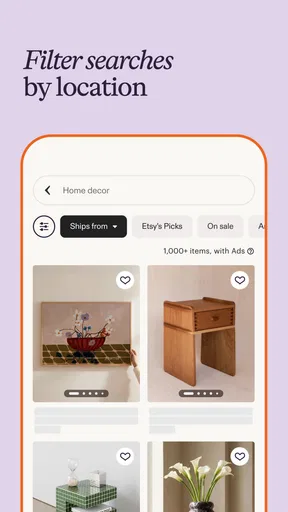
The app is a shopping app from Etsy, Inc, and its huge range can be both its charm and its challenge. I can start with a broad interest, such as a print for a bare wall, then narrow my search until I see options that fit the mood or size I have in mind. Filters are useful for turning a sea of results into a more manageable shortlist. Still, searching for a very general term can bring up plenty of choices that are not quite right, so I get better results when I include details such as the intended room, style, material, or recipient.
Connectivity matters throughout that process. Search results, shop pages, product details, and seller conversations are parts of an online marketplace, so I treat a reliable connection as important when I’m actively comparing or buying. A quick browse on a strong connection is comfortable; trying to make a considered choice while pages are slow or a signal keeps dropping is less so. I prefer to wait until I have a stable connection before checking several listings, especially if I want to compare photos and item descriptions side by side.
A useful companion for everyday shopping
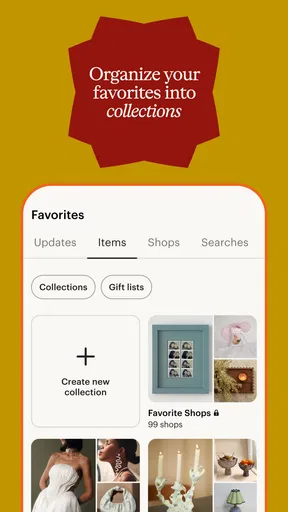
A realistic use for me is preparing a birthday gift in small moments between other tasks. I might browse on a commute, save a few promising finds, and return later at home to compare the details before choosing. Favorites are particularly handy here: they let me keep a shortlist rather than relying on memory or opening the same search again. I would use that space as a planning tool, not as a guarantee that an item will remain available or unchanged, so I still revisit a listing before I decide.
On a phone, Etsy suits discovery especially well. A spare few minutes can be enough to spot a style I like, while a longer session is better for checking the practical details that matter before an order. I find it helpful to separate casual browsing from purchase decisions: save interesting options when I’m out, then review descriptions, photos, shipping information, and shop details when I can give them proper attention. That small habit helps keep the fun of browsing from turning into an impulsive choice.
It is also a good fit for people who want to find work from independent makers, vintage pieces, or something with a more individual look than the standard options at a large retailer. If I need a particular style for a room, searching here can expose me to ideas I wouldn’t have found by looking only for a familiar brand. People who prefer a fast, uniform shopping experience, a tightly controlled catalogue, or a guaranteed match across multiple items may find a conventional retailer easier to use.
Checking details before committing
The most useful shopping skill in this app is slowing down at the right moment. I look closely at the item description and photos, check what is included, and read the shop information rather than judging a listing from its first image. For handmade or vintage goods, individual pieces can differ in ways that matter: dimensions, finish, condition, and the exact customization offered are worth understanding before placing an order. If something is unclear, the option to contact a seller is valuable, but I would ask a specific question instead of assuming that a custom request is automatically possible.
That extra attention is a trade-off. A large marketplace gives me variety, but listings come from different shops, so the details and presentation can vary. I cannot treat every product page as if it were part of one standardized catalogue. For a time-sensitive gift, I would check the delivery details carefully and leave room for uncertainty rather than choosing solely because an item looks ideal. If timing is the top priority, a nearby shop or a retailer with a clear, consistent delivery setup may be the safer choice.
Connectivity also shapes how I recover from interruptions. If a search or product page stalls, I avoid tapping repeatedly or trying to submit the same purchase action again and again. I first check whether the connection has returned, then revisit the listing or order area to see where I left off. For a purchase, it makes sense to confirm that the order went through before attempting it again. This is ordinary caution, but it can prevent confusion when a weak signal interrupts a checkout.
Choosing how much data to use
Because product discovery relies heavily on images, browsing can be more demanding than simply reading a few lines of text. When I’m using mobile data, I try to browse with a purpose: search for a specific kind of item, open the most promising listings, and save possibilities for a more careful comparison later. On a stable connection, I’m more comfortable exploring broadly and looking through product photos. If I’m keeping data use down, I avoid letting an open-ended browsing session run on without a clear goal.
A practical approach is to make a short list before opening the app: what the item is for, the style I want, and any size or material constraints. That gives filters and search terms a job to do and cuts down on wandering through unrelated results. I also keep a few alternatives in mind rather than falling in love with the first appealing listing. Comparing a small shortlist helps me judge the item itself, the shop’s information, and the fit for my needs instead of being guided only by attractive photography.
How it compares with familiar shopping apps
Compared with a general retail app, Etsy feels less like choosing from one uniform inventory and more like visiting many distinct shops. That is an advantage when I care about character, handmade work, vintage finds, or communicating about a particular item. It is less convenient when I want identical products from multiple sellers, a predictable format for every listing, or the quickest route to a standard household staple. For everyday essentials, a conventional retailer may make comparison and repeat purchasing simpler; for a gift or decorative piece with personality, I’m more willing to explore Etsy.
The app is free to download, and it has a 4.8 average from around two million ratings, with over 50 million installs. Those figures point to a well-established shopping destination, but they do not tell me whether a specific listing is right for my budget, timing, or taste. I still make that call by checking the individual shop and item. The Teen content rating is also worth knowing for households deciding what is appropriate for younger users.
Discovering Unique Finds
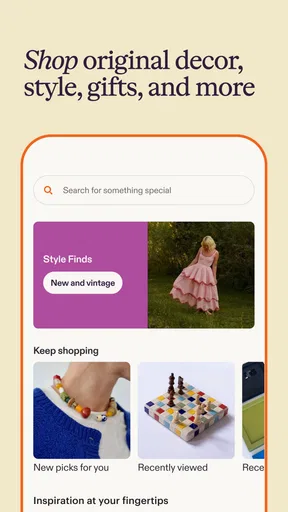
First things first, if you’re someone who appreciates unique and handmade goods, Etsy: Shop Home, Style & More is about to become your go-to app. From vintage treasures to custom-made pieces, it’s like wandering through a charming handmade market, all from the comfort of your couch. The app's interface is pretty intuitive, letting you easily search or browse through categories like clothing, home décor, and art. Trust me, it’s a rabbit hole of creativity that’s hard to resist.
User-Friendly Experience
I was pleasantly surprised by how easy it is to navigate. The search function is robust, offering filters that help narrow down exactly what you’re looking for. Whether you’re searching for a gift, something for yourself, or just window shopping, everything’s only a few taps away. Plus, you can save your favorites to a list, which is super handy for organizing your wish lists or planning future purchases.
Supporting Small Businesses
One of the coolest things about Etsy is the opportunity it provides to support small businesses and independent artisans. Each shop has a story, and you can feel the passion and craftsmanship behind every product. This isn’t just shopping; it’s connecting with creators from all over the world. The app makes it easy to communicate with sellers too, which is awesome if you need a custom order or want to learn more about a product.
Seamless Shopping Experience
When it comes to making a purchase, the app ensures a smooth process. Payment is straightforward, and there are multiple options available, so you can choose what’s most convenient for you. Tracking your orders is also a breeze, letting you know exactly when to expect your package. And, if you’re anything like me, that anticipation is half the fun!
Overall, Etsy: Shop Home, Style & More is a delightful blend of convenience and creativity. It’s more than just an app; it’s a portal to a world of unique products and endless inspiration. Whether you're gifting or treating yourself, this app has something special for everyone. Happy shopping, and enjoy discovering your next favorite find!
My connectivity verdict
I recommend Etsy when the search itself is part of the pleasure and I’m willing to inspect individual listings before buying. It works particularly well for inspiration, thoughtful gifts, and distinctive home or art finds, especially when I can save promising options and return to them on a steady connection. I would choose another route for a purchase that must arrive by a strict deadline, for a standardized item I need to compare quickly, or when I cannot spend time checking shop-specific details. Used with that distinction in mind, it’s a rewarding place to browse, while a good connection and a careful final check make the shopping experience much more dependable.
Privacy and Permissions
See what permissions an app requests and how it handles your data.
- Device & app history
- retrieve running apps
- Identity
- find accounts on the device
- Contacts
- find accounts on the device
- Location
- approximate location (network-based), precise location (GPS and network-based)
- Photos/Media/Files
- read the contents of your USB storage, modify or delete the contents of your USB storage
- Storage
- read the contents of your USB storage, modify or delete the contents of your USB storage
- Camera
- take pictures and videos
- Microphone
- record audio
- Wi-Fi connection information
- view Wi-Fi connections
- Other
- view network connections, full network access, change your audio settings, run at startup, control vibration, prevent device from sleeping
Verdict
Strengths of Etsy: Shop Home, Style & More
- User-friendly interface for easy browsing.
- Extensive range of unique handmade items.
- Secure payment options available.
- Personalized recommendations enhance shopping.
- Supports small businesses globally.
Limitations of Etsy: Shop Home, Style & More
- Occasional app crashes reported by users.
- Shipping fees can be high for some items.
- Limited seller support within the app.
- Search results can be inconsistent.
- Some items have long delivery times.
Other Releases by Etsy, Inc
View All
Etsy Seller: Manage Your Shop
Business4.6
Similar Picks in This Category
View All
SHEIN-Shopping Online
Roadget Business PTE. LTD.4.8

Amazon Shopping
Amazon Mobile LLC4.4


Mercado Libre: Compras online
Mercado Libre4.8

Wish: Shop and Save
Wish US Holdings LLC4.7

Alibaba.com - B2B marketplace
Alibaba Mobile4.4
You May Also Like
View All


Frequently Asked Questions
What is Etsy: Shop Home, Style & More?
Etsy: Shop Home, Style & More is a marketplace app that connects buyers with independent creators and sellers. It offers a vast array of unique and handmade items, including home decor, fashion, and personalized gifts. The app provides a platform for small businesses and artisans to reach a global audience, making it an ideal place for finding one-of-a-kind products.
How do I create an account on Etsy?
To create an account on Etsy, download the app from the Google Play Store or Apple App Store. Open the app and select 'Register.' You can sign up using your email, Google, Apple, or Facebook account. Follow the prompts to complete your profile, and you’re ready to start shopping or selling on Etsy.
Is purchasing on Etsy secure?
Yes, purchasing on Etsy is secure. The app uses encryption and secure payment gateways to protect your financial information. Etsy also offers a Purchase Protection program to help resolve any issues with orders. Always ensure you’re buying from reputable sellers by checking their reviews and ratings within the app.
Are there any fees for using Etsy as a seller?
Yes, selling on Etsy involves certain fees. These include a listing fee for each item you post, as well as transaction and payment processing fees once an item sells. The fees are designed to support the marketplace’s operations, including marketing and customer support. More detailed information is available on Etsy’s official website.
Can I customize or personalize items on Etsy?
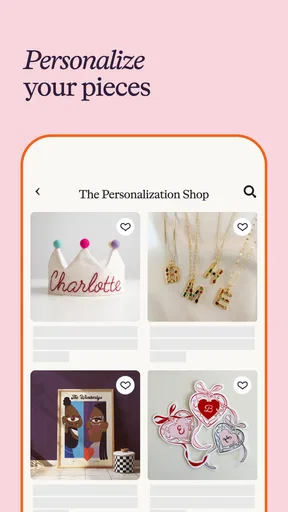
Absolutely! Many sellers on Etsy offer customization options for their products. When viewing an item, look for personalization fields or instructions in the product description. Communicate directly with the seller to discuss specific requests or custom orders, ensuring you get a product tailored to your preferences.
